
The Ultrassist Replaceable SKin IV Practice Arm is designed for repeated use in nursing schools, hospitals, and training centers. To ensure the best simulation experience, it's important to know how to properly replace the silicone skin and vein system when needed.
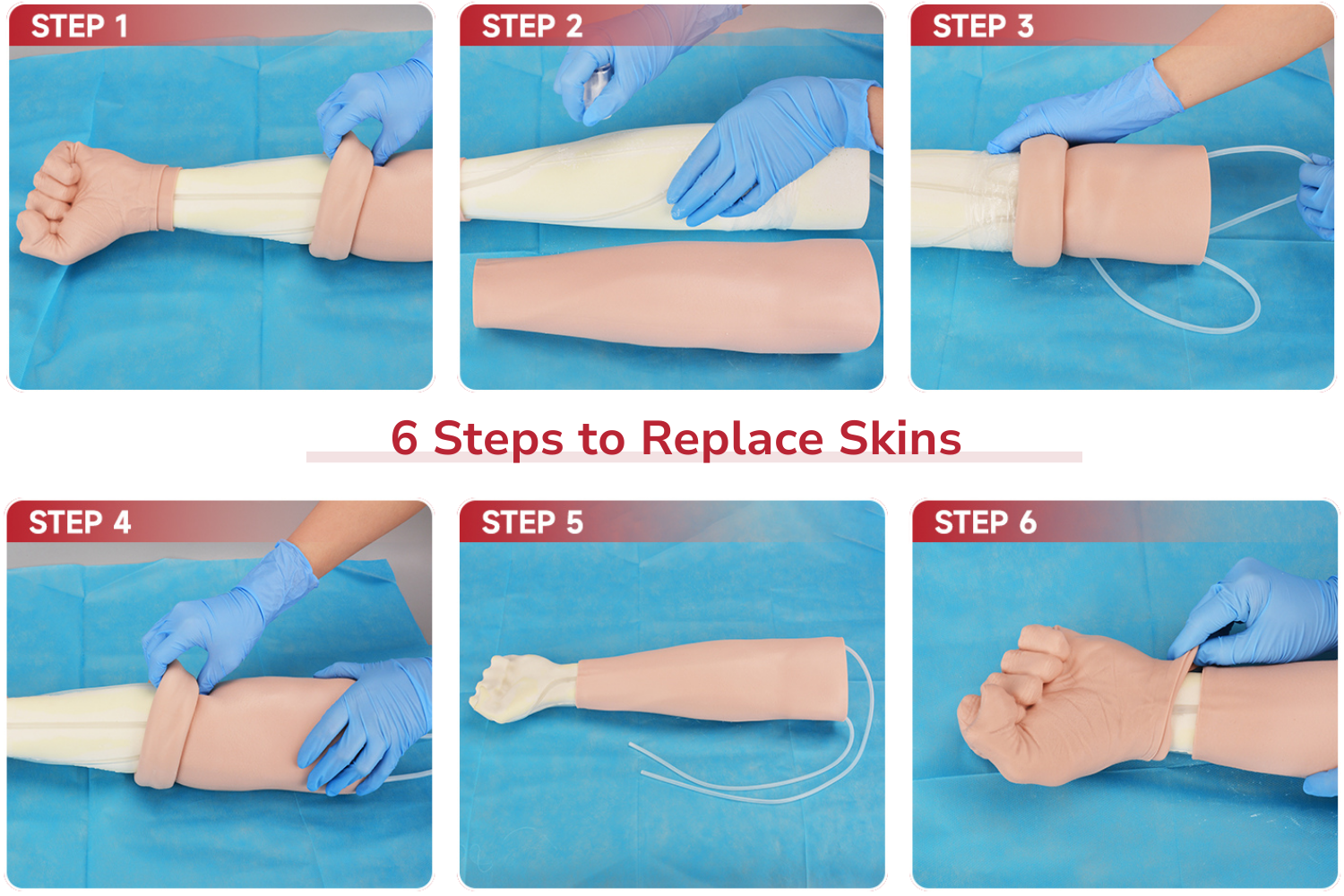
Here's a step-by-step guide to replacing the skin on your IV practice arm:
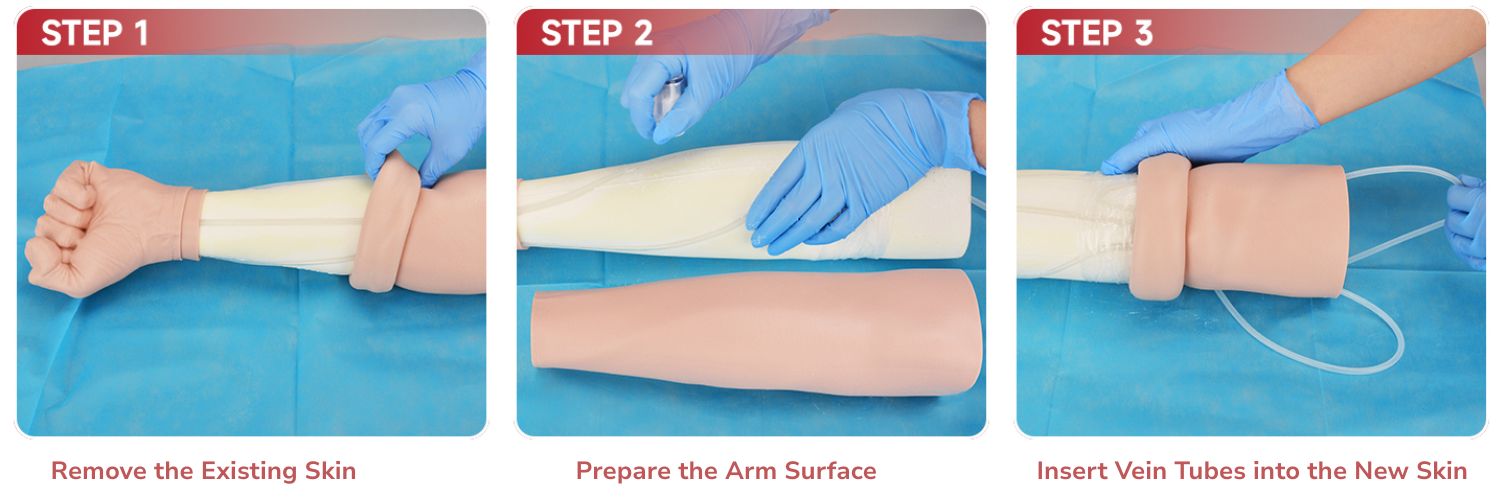
Step 1: Remove the Existing Skin
Gently flip the silicone skin backward toward the elbow, carefully peeling it off the arm model. Avoid pulling too forcefully to prevent damage.
Step 2: Prepare the Arm Surface
Lightly dust the foam arm model surface and the inner side of the skin with talcum powder. This reduces friction and makes installation smoother.
Step 3: Insert Vein Tubes into the New Skin
Fold the new silicone skin slightly and insert both silicone tubes through the wider opening at the elbow end.
.jpg?w=1500&h=500)
Step 4: Slide the Skin onto the Arm
Starting from the elbow end, gradually slide the new skin toward the hand. For easier application, firmly grip the foam arm model with both hands while guiding the skin.
Step 5: Adjust and Fit the Skin
Check that the skin is fully in place, evenly fitted, and free of folds or air pockets. Ensure the vein tubing is correctly aligned.
Step 6: Finish with the Palm Section
Install the skin around the palm area in the same manner, making sure it fits smoothly and securely.
Maintaining Your Training Arm
By following these steps, you can quickly replace the skin and veins, extending the arm's lifespan and ensuring realistic venipuncture and IV training sessions.
💡 Tip: Need extra skins or vein inserts for your replaceable skin IV practice arm? Contact our team for replacement options.
.jpeg?w=650&h=350)
.jpg?w=800&h=800)
.jpg?w=800&h=800)
_1.jpeg?w=800&h=800)
_1.jpeg?w=1600&h=1600)
_1.jpeg?w=1600&h=1600)
.jpeg?w=1500&h=1500)
.jpeg?w=1600&h=1600)
.jpeg?w=1500&h=1500)
.jpeg?w=1500&h=1500)
.jpeg?w=1600&h=1600)
.jpeg?w=1600&h=1600)
.jpg?w=1500&h=1500)
.png?w=1000&h=1000)
.jpg?w=1500&h=1365)
.jpg?w=1500&h=1500)
.jpeg?w=1500&h=1500)
.jpg?w=1000&h=1000)
.jpeg?w=1600&h=1600)
.jpeg?w=1600&h=1600)
.jpeg?w=1600&h=1600)
.jpeg?w=1600&h=1600)
.jpeg?w=1600&h=1600)
.jpeg?w=1600&h=1600)
.jpeg?w=1600&h=1600)
.jpeg?w=1500&h=1500)
.jpeg?w=1500&h=1500)
.jpg?w=1500&h=1500)
.jpg?w=1500&h=1500)
.jpg?w=1500&h=1500)
.jpg?w=1500&h=1500)
.jpg?w=1000&h=1000)
.jpg?w=1000&h=1000)